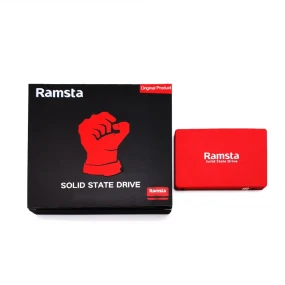
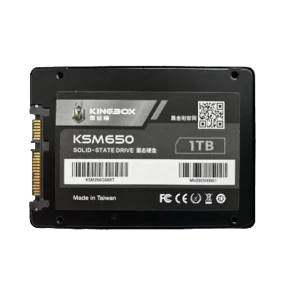
The Latest SSD /Solid State Drive Best Price in Bangladesh. EMI & Warranty Available
The SSDs are solid-state drives (SSDs) that make it possible to take advantage of the latest computer technology without having to purchase a new .
They offer longer battery life, faster performance, and more reliable data transfer rates. SSDs also make it possible to use less power, as they do not any moving parts such as traditional mechanical hard disks.
This is why SSDs are considered one of the best ways to speed up your computer.
What is an SSD?
Solid-State Drives (SSDs) are becoming a more common part of computers in the world, thanks to the emergence of SSDs in laptops, smartphones, and tablets. The primary benefit of an SSD is its speed and power savings. The main drawback is that very often it doesn&rsquot match up with native storage capacity. Also, if you use your laptop to store lots of data regularly, you may have to pay for additional space on your laptop&rsquos hard drive to store all that data again.
So what is an SSD? It&rsquos a flash memory device used as the main storage medium for your computer.
Benefits and drawbacks of SSDs
Solid-state drives (SSDs) are found in a wide variety of computers. SSDs used in your notebook computer, operating , and other applications:
&bull SSD used in the most recent Macbook Pro
&bull SSD used in the most recent MacBook Air
&bull SSD used in some Windows PCs
These SSDs have many advantages over traditional hard disk drives. They are much faster than floppy disks, so they can store more data at once. They are also very thin and light when you install one on your computer, you may barely notice it is there. SSDs can be erased and re-programmed just as easily as a hard disk drive. An advantage of this is that if you make a mistake, you can revert to an earlier version of your work or simply erase all data from an SSD.
There are some disadvantages to SSDs as well. Because they use flash memory rather than spinning disks, they are much more difficult to upgrade than traditional hard disk drives (they have to be replaced with new ones at least every two years). By contrast, traditional hard disk drives last up to 10 years without being replaced &mdash but with standard software upgrades and everything else that comes with them. Flash memory has no moving parts, so it is less likely to fail than a spinning disk drive. An advantage of this is that if anything goes wrong with an SSD while it is being used on your computer, it will be very easy to replace &mdash you don&rsquot have to take off the battery or remove the old drive before replacing it there&rsquos no danger of doing any damage by doing so! On the downside, flash memory does not tolerate write errors very well-read errors can erase data on an SSD instead of repairing it &mdash but even if these errors do occur, removing the old drive and installing a new one will usually repair them best&hellip unless something went wrong again during the process (which almost certainly would happen).
The main advantage that SSDs provide over conventional hard disk drives (HDDs) is greatly increased storage capacity: for example, if you use about 1 TB of space on your laptop with an HDD (and perhaps 4 TB on a desktop), then with an SSD (about 15 GB), you could potentially store up to 200 TB! If this sounds like a lot now consider how much space we would need in physical form if we stored all our information electronically instead: 20 Petabytes? I dare say we could have many
How to install an SSD on your PC or laptop
Data storage devices are getting increasingly smaller, faster, and cheaper. They have largely replaced the optical discs that used to be the primary means of storing data on computers. With a solid-state drive (SSD), you can speed up your computer without having to sacrifice performance or having to replace parts of your hard disk.
SSDs have been around for several years, but have only been getting more popular in recent years. The reason is clear: they are much faster than traditional hard disks, which were once considered the only way to store data on computers.
There are two types of solid-state drives:
&bull They&rsquore manufactured with flash memory instead of mechanical disks that must spin at very high speeds (usually 7200 RPM). This also means they can be much smaller and lighter some SSDs are as thin as a penny!
&bull They&rsquore designed as solid-state drives because they don&rsquot contain any moving parts that wear out over time. This also means they do not need power supplies or batteries if you use them on battery power only (as is the case with many laptops).
What does this mean for you? Well, it&rsquos great if you plan to use your computer for an hour or less per day and want to optimize speed for this purpose. It might not be such a good choice if you plan on using your computer all day long like I do and do not need extremely fast storage on every page visited &mdash though I should point out that it is still possible to get an SSD for less than $100 without sacrificing too much performance for my purposes &mdash but in general it does make sense for people who want immediate access to their files whenever they need them rather than having to run a separate slow storage device.
The first type (and likely most common) SSDs come in M-series, which offer sequential read speeds up to 3200 RPM (which is enough for most people) while offering sequential write speeds up to 4500 RPM. The second type (and likely most uncommon) are T-series, which offers sequential read speeds up to 3600 RPM while offering sequential write speeds up to 5200 RPM.
How to speed up your computer with an SSD
Solid-state drives (SSDs) are the future of storage and computers. They are built to be incredibly fast, have very low power consumption, and are capable of handling heavy workloads. Like a hard disk drive (HDD), SSD is a mechanical device that stores information on a spinning platter. SSD has an additional advantage over HDD which is that it is fast enough to handle heavy load and high data throughput without overheating. It also consumes an extremely small amount of power. Capacity and price are the main factors driving demand for SSDs today.
If you want to accelerate your computer with an SSD, not only should you get one, but you should make sure your can take full advantage of the technology by installing one. Here are some helpful links:
There are two types of SSDs available for computers: solid-state drives (SSD) and hybrid drives (Hybrid). For most users, buying an SSD will be a better decision because it will result in higher performance, lower cost, and smaller size than an HDD. Why? Because there are no moving parts inside the computer that need to wear out or break down the components do not have to be replaced as often as those in an HDD there is no risk of failing cables or connectors, and there is less maintenance required than in hard disks (which can wear out or break down over time).
The best SSD (Solid State Drive) Price in BD

 ৳0.00
৳0.00